Device: Intenso 64 GB USB stick (Alcor controller), 8 years of family photos and videos
Symptoms:
- Windows can read the whole stick, no read errors at all…
- …but most photos open half grey, striped or shifted, and many videos won’t play.
- Several folders had vanished.
Why “no read errors” means nothing on a cheap stick
- The memory chip inside is worn out. Data stored years ago has faded.
- The controller still sends the data back, but it doesn’t report that a block was wrong. You get garbage with no error message.
- Two kinds of damage turned up:
- blocks of pure noise, where the controller points to the wrong or erased memory
- blocks with too many flipped bits for its error correction
- Reading it again doesn’t help. Some of the wrong bits come back different on each read, so averaging several reads can’t fix them.
- The stick also wasn’t safely removed, and 39 folders’ directory entries were destroyed. That’s why folders disappeared.
The approach
- Read-only image first. The stick was write-blocked and copied once, completely, into an image file. All further work happened on the image. A dying stick gets one careful read, not a dozen attempts.
- Rebuild the file system from the image: the lost folders were found again, file dates kept, and every file checked against the image.
- Grade the contents, not the copy log. Every photo and video was checked. 1,856 files were fine; 2,904 were damaged.
- Repair the damaged files. Photos are rebuilt around the damaged parts, using the small preview picture every camera stores inside the file as a guide. Videos get their broken index repaired from the actual picture and sound data.
- Recover files with no folder by searching the free space for photos and videos.
Result
- Photos: 4,096 of 4,283 recovered (96 %). Most are fully intact or ≥ 95 % repaired; some show visible damage; 187 lost (pure noise).
- Videos: 188 of 204 play (7 picture only).
- 1,226 extra photos and videos found that had no folder any more.
- Delivered: 5,805 files, every one verified identical on the delivery stick.
The second stick (same customer): “No Media / 0 bytes”
This one shows the controller’s generic ID with 0 bytes. The controller is alive but has lost its map of the memory. It’s a “monolith” stick: the memory chip is sealed inside one block, with no pads you can simply connect to.
- Don’t run the factory “mass production” tools. They wipe the stick.
- Getting data off a monolith means opening the package for a specialist reader.
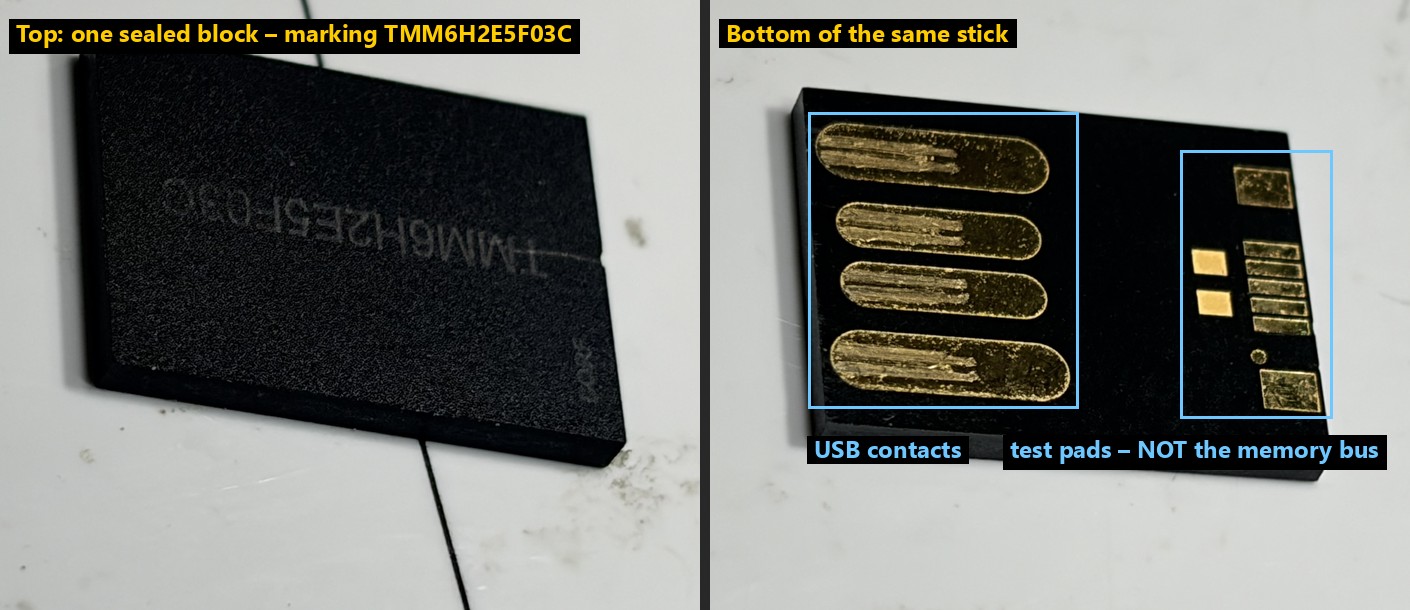
Those small pads are not a way in. A raw memory chip needs about 15 signals (8 data lines, control lines and power). The visible pads are far too few, and they measured as factory test points. The real memory bus is hidden under the coating.
Can you do this yourself? Our free Windows app
NoPowerFix for Windows has a Data Recovery tab built on the same approach: a read-only image first, then the files are rebuilt, graded and repaired. Before you download it, check that your case is one it can help with:
It CAN help when:
- files were deleted from a USB stick, SD/microSD card or external hard drive, and nothing new has been saved over them yet
- the stick or card was quick-formatted
- folders vanished, Windows says “You need to format the disk”, or the drive shows as RAW
- files copy but open broken (half-grey photos, videos that won’t play) and the data is still on the device, like the first stick here
- the device has some unreadable areas: it is imaged once and the bad areas are skipped
- an external SSD over USB lost its partition or file system (but see the SSD line below)
It CANNOT help when (no software can):
- the device isn’t detected at all: no drive letter, not in Disk Management, no power
- it shows “No Media”, 0 bytes or the wrong capacity, like the second stick here. The controller has lost its map, and only a lab chip read can get the data. Never run factory “mass production” tools on it.
- it’s physically broken: a snapped connector, a cracked chip, water damage. The board has to be repaired first.
- files were deleted from an SSD with TRIM (any internal SSD, most modern ones). The drive erases them by itself.
- the data was overwritten: new files saved over it, a full format, a secure erase or a Windows reinstall
- the drive is BitLocker-encrypted and you don’t have the recovery key
- it’s a phone’s internal storage, which isn’t a USB drive
- a hard drive is clicking or beeping. Stop using it at once. That’s a mechanical fault and a lab job, and every scan makes it worse.
Whatever your case: stop using the device, and never save recovered files back onto it.
Lessons
- “0 errors” on a cheap stick says nothing. Open and check the files.
- Image once, read-only, then work on the copy.
- No Media / 0 bytes + a generic controller ID = the map is lost, not a dead chip. Don’t format, and don’t run factory tools.
Was this your fault too? Post your readings below — and if it fixed it, mark the solution so the next person finds it.