Device / model: Apple iPhone 14 Pro Max (seen on two different phones, iOS 26.5.2)
Symptom: the screen flashes pink / magenta, then the phone restarts. Some of these phones reboot every few minutes.
Result: a new front sensor (proximity) flex fixed it. No more pink screen, no more reboots.
Cause: the flex had been pinched with tweezers during an earlier screen replacement.
The panic line
Settings → Privacy & Security → Analytics Data → the newest panic-full file:
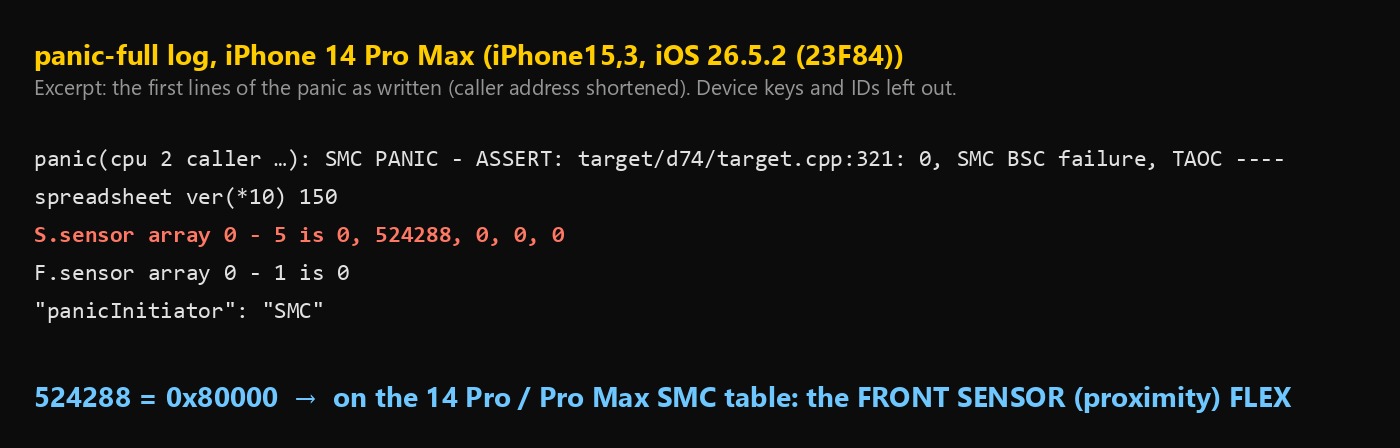
The second phone had 194 panics, all with this same line.
The number that matters: 524288 = 0x80000
- SMC is the chip that watches power, temperatures and sensors. When a sensor it relies on stops answering, it resets the whole phone.
- The line
S.sensor array 0 - 5 is 0, 524288, 0, 0, 0says which sensor went missing. Convert the number to hex: 524288 = 0x80000. - On the iPhone 14 Pro / 14 Pro Max, 0x80000 = the front sensor flex (the proximity sensor at the top of the screen). All three public SMC panic tables agree on that, and a 14 Pro with exactly this line was fixed by a new proximity flex.
- The pink screen is only a side effect. The sudden reset cuts the display’s power mid-frame, and the OLED flashes magenta on the way down.
The trap we fell into first
The SMC also saves its last conversation inside the panic file. Decoding it, every battery temperature reading came back as 0 with an error flag, and the battery on the second phone was worn (1,244 cycles, ~82 %). Everything seemed to point at the battery’s fuel gauge.
That was wrong. It was never confirmed by a battery swap, and the front sensor flex fixed the phone. The sensor array number was the real clue all along.
Test order
- Read the
sensor arraynumber in the panic and look it up for that exact model. The same number means different parts on different iPhones. - 0x80000 on a 14 Pro / Pro Max: check the front sensor flex. Replace the flex. Two common ways it gets damaged:
- During a screen replacement: it’s easy to pinch or nick with tweezers. That’s what happened on this phone.
- After liquid damage: corrosion on the flex or its connector does the same.
- Only if the panic stays: the battery and its connector.
Don’t restore or DFU it. This error sits below iOS, so software can’t fix it.
Lessons
- “SMC BSC failure” + pink screen + reboot: decode the sensor array number first. It names the part.
- A plausible-looking clue isn’t a confirmed cause. Here the battery data looked convincing, but only a part swap proves it.
- Had the screen replaced before? Suspect the front sensor flex first. One slip with the tweezers is enough.
- The pink flash looks like a display fault, but it’s just how the screen looks while the phone resets.
Was this your fault too? Post your readings below — and if it fixed it, mark the solution so the next person finds it.
All iPhone 14 Pro and 14 Pro Max restart codes, with the part behind each one: iPhone 14 Pro Restarting Every 3 Minutes? Codes & Fix